



Discuss any record, loop in the right teammate, and see what changed, all without leaving Lifecycle Manager.
Every client record has a story, but the conversation about it usually happens somewhere else. A technician flags a laptop in Teams. A vCIO asks about a renewal over email. A goal gets debated in Slack, and the context is gone by the next QBR.
- Why was this device pulled from reporting?
- Who's handling this renewal?
- What did we decide about this initiative?
Lifecycle Manager already holds the data behind your client strategy. Now we've added collaboration features that keep the discussion right next to it.
Comments: keep the conversation on the record
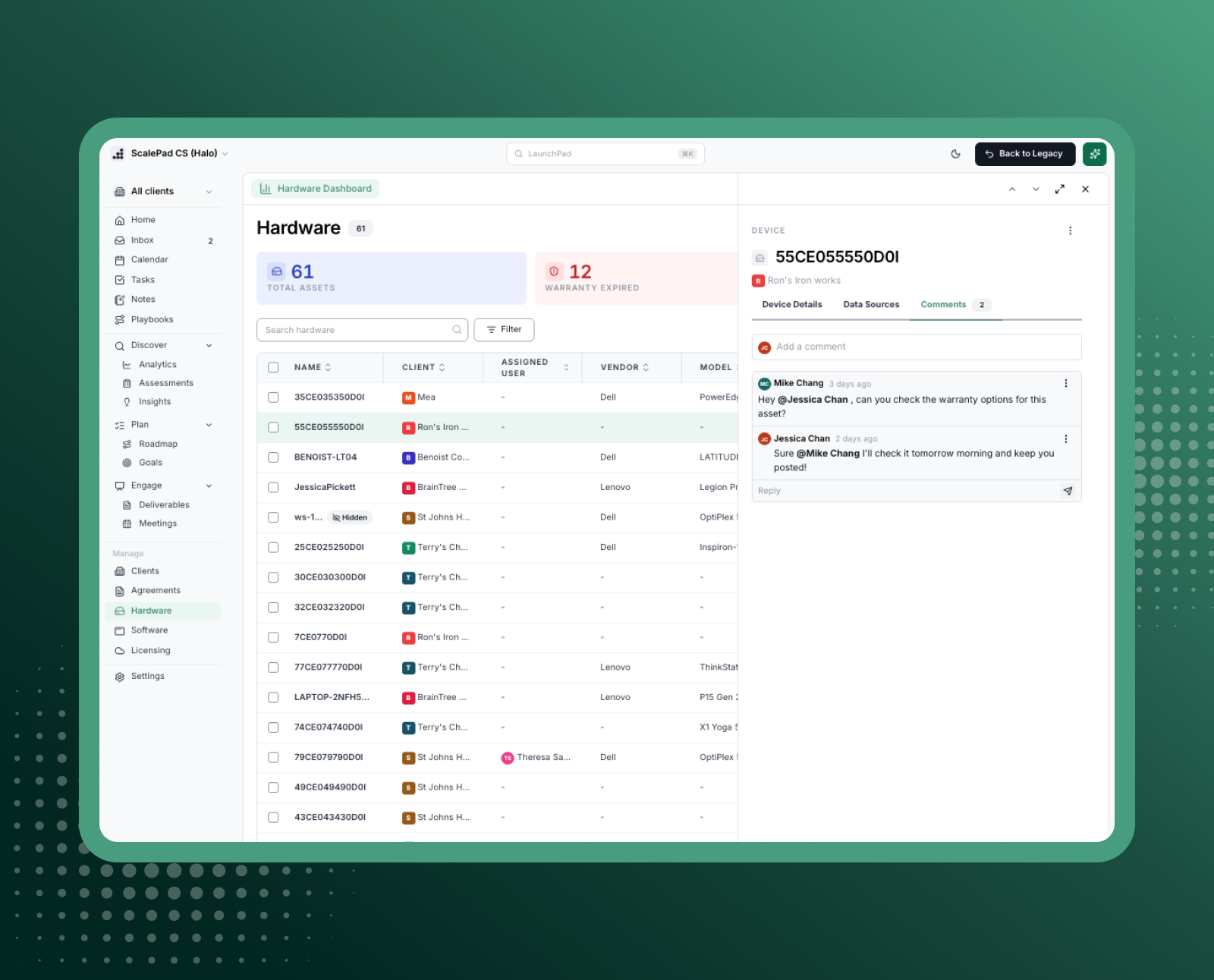
Each supported record now has a Comments tab in its drawer, beside the details you already work from. Start a thread, reply in context, and format with headings, lists, links, and images. Comments are available on hardware assets, installed software, goals, initiatives, meetings, contacts, agreements, and tasks.
Why is this important?
- Context that fields can't capture. Structured fields tell you what a record is. Comments tell you why it matters: the client's hesitation on a refresh, the exception agreed on a contract, the screenshot that explains an issue.
- One thread, no hunting. Replies sit under the original comment, so anyone who opens the record sees the full discussion instead of piecing it together from inboxes and chat channels.
- Permissions you already manage. Comments follow each record's existing access, including Client Access Groups. There are no new roles to configure.
Mentions and Inbox: know when someone needs you
Type @ in any comment to bring a teammate in. They're notified in the new Inbox, found in the left navigation under Home, with an unread badge so nothing slips past. Each notification shows who mentioned them, the record, the client, and a snippet of the comment. Reply straight from the Inbox without leaving the page you're on.
Why is this important?
- Ask the right person, directly. Need a technician's take on a failing server or an account manager's read on a renewal? Mention them on the record itself, and the question arrives with its context attached.
- Unread means unhandled. Opening the Inbox doesn't clear your badge. Items are marked read only when you open or reply to them, so your count reflects what still needs attention.
- Notifications on your terms. Every user controls their own in-app notifications from Settings > Personal > Notifications.
Put it to work
- Hardware refresh planning: A vCIO comments on an aging workstation and @mentions the technician to confirm its condition. The reply lands on the same record, ready for the client meeting.
- Agreement renewals: An account manager notes the client's pricing concerns on the agreement and mentions the vCIO, so the renewal strategy lives with the contract.
- Goals and initiatives: The team logs decisions, blockers, and next steps on an initiative, so QBR prep starts with the full story.
- Meeting follow-up: Post takeaways and screenshots on the meeting record, then tag the owner of each action item.
Context and history in one place
Comments capture what your team knows. Mentions and the Inbox make sure the right person sees it. Together, they turn every record into a shared workspace, so your team spends less time chasing answers and more time advising clients.
Available now
Open any supported record and select the Comments tab to start a conversation. Find your mentions under Inbox in the left navigation.
Want to see these new capabilities in action? Log into the platform or Book a Demo today.